

Decisions
A decision is a question an agent asks when it cannot continue without you. This page shows how you answer on the PC and on your phone, and how an agent asks. For the idea in two sentences, see Core concepts.
How you notice a question
A task with a question is Pending and shows the question and an answer form right on the task, in Todo or Doing. You can also see Pending tasks on the mobile monitor.
Answer in the browser
Choose one of the offered options, write a note, or do both, then send the answer. The answer is recorded, and the agent state becomes Idle in the task's current column. The agent reads your response before it decides how to resume.
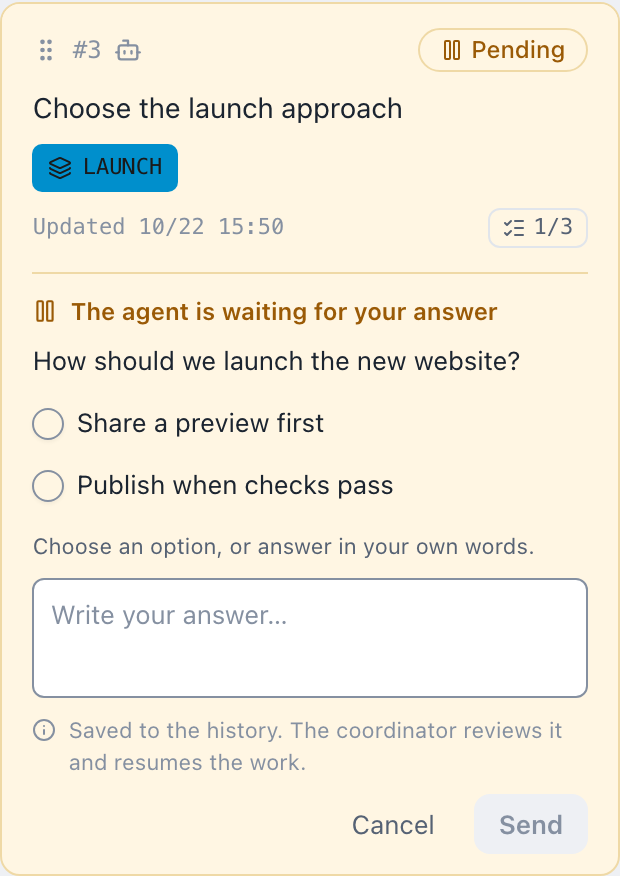
The task shows the question, the options, and a text field for a note. Your answer stays available to the agent, and a concise reason is saved to the history.
- On the PC board you can still open the task's details and drag it while the answer form is in use.
- Moving the task to Done clears whatever you typed in the answer field.
- A question has no expiry. It stays open until it is answered, or until moving the task withdraws it or the agent replaces it.
Answer on your phone
On the mobile monitor, a Pending task shows the same answer form. Tap the task to open its Body, Conditions, History, and Epic drawer, and swipe sideways to switch tabs. See Mobile monitor for connecting a phone.
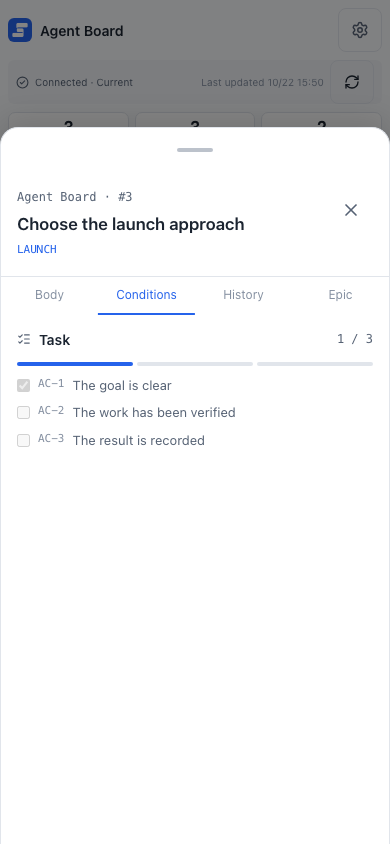
How an agent asks
This section is for people who write or configure agents. The exchange looks like this:
An AI-owned task can ask in Todo or Doing, but it must be in Doing to become Running. The agent skill asks with two to ten choices. The CLI accepts a question and zero to ten options as JSON with --request-json, either inline or from standard input with -:
{
  "question": "Which launch approach should we use?",
  "choices": [
    { "id": "preview", "label": "Publish a preview first" },
    { "id": "public", "label": "Launch publicly" }
  ]
}
Send it inline:
agboard --project "My project" state 1 pending --actor ai --request-json '{"question":"Which launch approach should we use?","choices":[{"id":"preview","label":"Publish a preview first"},{"id":"public","label":"Launch publicly"}]}'Or read it from standard input:
cat question.json | agboard --project "My project" state 1 pending --actor ai --request-json -choices takes 2 to 10 options; a request with fewer than 2 or more than 10 is refused, and so is a pending state without --request-json. The request gets an ID, which you can read with show or snapshot.
Ask and wait for the answer
A pending --request-json command waits for the answer by default, even when the JSON omits wait. A running agboard serve is required for this waiting path. When the request is answered, the command prints the task and answer. Existing requests with "wait": {} still wait indefinitely.
Use these three forms as needed:
Default wait until an answer, with no wait field:
agboard --project "My project" state 1 pending --actor ai --request-json '{"question":"Which launch approach should we use?","choices":[{"id":"preview","label":"Publish a preview first"},{"id":"public","label":"Launch publicly"}]}'To register a question and return immediately, use --no-wait:
agboard --project "My project" state 1 pending --actor ai --request-json '{"question":"Which launch approach should we use?","choices":[{"id":"preview","label":"Publish a preview first"},{"id":"public","label":"Launch publicly"}]}' --no-waitAdd a timeout to wait for at most 600 seconds (1 to 86,400 seconds is allowed):
agboard --project "My project" state 1 pending --actor ai --request-json '{"question":"Which launch approach should we use?","choices":[{"id":"preview","label":"Publish a preview first"},{"id":"public","label":"Launch publicly"}],"wait":{"timeoutSeconds":600}}'--no-wait does not need a running server. Both waiting forms require agboard serve; the CLI checks that it is available before saving the question. --no-wait can be combined with wait: {}, but combining it with an integer timeoutSeconds is an invalid_argument error (exit 2) and leaves the question, state, and history unchanged. wait: null and timeoutSeconds: null mean no timeout. Invalid JSON, unknown fields, wrong types, or an out-of-range timeout return invalid_value (exit 2); --no-wait on a command other than pending --request-json returns invalid_argument (exit 2).
- A timeout or Ctrl+C stops waiting but leaves the question Pending.
- A lost server connection returns
board_unavailable, a technical error that also leaves the question Pending. - If moving the task withdraws the question, the command exits with
request_changed.
Answer from the command line
A person can also answer from the CLI by passing the request ID:
agboard --project "My project" state 1 idle --actor human --request "<request-id>" --choice preview --reason "Get feedback before the public launch"You can supply a choice, a note with --reason, or both. After reading the full response and history, the agent resumes:
agboard --project "My project" state 1 running --actor ai --reason "Preparing the preview requested by the user"Next
- Working with agents: the full work loop, including waiting.
- Troubleshooting: an answer that is refused or a question that disappeared.